Arcadia:
Home Page
Donate $
Contact UsCommunity:
Bulletin Board
Synthetic Reality
Toys:
Collaboration
DomiNation
Empyrion
synChess
synJam
synJet
synPool
synSpades
synSpace
synVille
synVideo
TurnAbout
API Events:
TA_OnLoaded
TA_OnStartGame
TA_OnStopGame
TA_OnStateAnimationDone
TA_OnCanStartGame
TA_OnCanJoinGame
TA_OnSize
TA_OnPing
TA_OnTick
TA_OnText
TA_OnPlayerSlotChange
TA_OnPlayer
TA_OnPlayerInfoNeeded
TA_OnPlayerClick
TA_OnGetPlayerMenu
TA_OnDoPlayerMenu
TA_OnPacket
TA_OnMouse
API General:
TA_Log
TA_IsModerator
TA_SendPacket
TA_IsKeyDown
TA_Print
TA_MouseLoc
TA_MaxPlayerSlots
TA_NthPlayerSlot
TA_PlayerName
TA_NumCards
TA_NthCardId
TA_GetCardProperty
TA_SetCardProperty
TA_SetState
TA_GetMsec
API Graphics:
TA_SetRenderMode
TA_FillSolidRect
TA_LineTo
TA_DrawText
TA_Ellipse
TA_Polygon
TA_CreateImage
TA_DestroyImage
TA_LoadImage
TA_EraseImage
TA_CopyImage
TA_StretchImage
TA_GetImageSize
TA_GetPixel
TA_SetPixel
TA_DrawFace
API
Sound:
TA_PlayWAV
TA_PlayMIDI
API Playing Cards:
TA_StockCardsInfo
TA_DrawStockCard
TA_StockDeckShuffle
TA_StockDeckPeek
TA_StockDeckTake
API Bags:
TA_SetBagValue
TA_GetBagValue
TA_NumBagItems
TA_GetNthBagItem
TA_DeleteBagItems
API EditBox
TA_EditBoxCreate
TA_EditBoxDestroy
TA_EditBoxShow
TA_EditBoxSetRect
TA_EditBoxSetText
TA_EditBoxGetText
|
| TurnAbout is one of the toys which
can be played in Arcadia. It is a
user-programmable, cards-metaphor, open-API,
Lua-scripted, board game engine.. thing. This page documents the
API (Applications Programming Interface) by which
you can create a new Deck Style Script (written
in lua) and thereby make a
brand new game (or extend an old one) to be
played inside TurnAbout.
THE
INFORMATION BELOW CAN BE ASSUMED TO BE
INCOMPLETE, AND POSSIBLY IN ERROR. THE API IS
STILL IN DEVELOPMENT. IF YOU HAVE SUGGESTIONS,
PLEASE POST IN THE ARCADIA FORUM.
|
| Overview The idea is that when a
player picks a 'deck' to play in TurnAbout, that implies a deck
style and for every deck style there is
a game, a game whose basic functionality is
written in a lua script. Please see TurnAbout's
web page for some hints on creating a new deck
style. This page is concerned with the contents
of your lua script.
Your deck style
will have a name, and your lua script will have
the *same* name. That name must be a legal file
name and will be located in a directory under
your current Arcadia Serial Number (so that
people don't mess up each other's scripts). So,
there is exactly one lua file you should be
editing, and that is:
.../arcadia/toys/toy10/Assets/Styles/<your
serial number>/styleName/styleName.script
Where
'styleName' is the name you gave your new deck
style. Before you can play your game, you will
need to create at least one card in your deck
style, and a deck containing at least one card
from your deck style. Then you can select that
deck on the TurnAbout toy options dialog, and the
next time you press START GAME, you will be
playing YOUR game.
Eventually,
script files will be shared automatically, but
for now you will have to share them manually.
Script files are not allowed to read or write to
disk, the goal being to NOT allow a style script
to act as a virus, spybot, or other negative
energy creation. If you feel this security is not
being properly imposed, please let me know ASAP.
You might be
thinking that your lua script should be an
infinite loop (a game loop) constantly getting
user input, doing caclulations, advancing game
state, and rendering. You would be wrong. The
main loop still belongs to Arcadia/TurnAbout and
you must be completely 'event-driven'
Game
State
The TurnAbout
engine is in one of the following states at any
given time:
- PICK
DECK (the moderator is picking
one of his or her decks, no lua script is
loaded, and no players have JOINed the
game.
- JOIN
GAME (the moderator has picked
the deck, people are fetching the deck,
the script, and any assets they need.
Once they have fetched the files, they
can press their JOIN GAME button to get
assigned a slot in the not-yet-started
game. Since your script has been loaded,
you can be rendering the screen as you
see fit, perhaps indicating the current
player slot list, asset fetching status,
etc. You can send packets which are seen
by anyone who has finished fetching (and
loading) their copy of the script.)
- GAME
IN PROGRESS (this is actually
several possible states, depending on how
you want to organize things. TurnAbout
offers you various sub states you might
enjoy, like rolling dice, having arcadia
faces walk around the stonehenge board,
etc. If your script doesn't need these
features, then you can just consider it
being 'in-game'. This also goes for 'GAME
OVER' which is something your script
decides has happened. Just because the
game is over doesn't mean you have to
stop rendering the screen. You could show
high scores, etc. What really counts is
when the game is STOPPED. At that point
your script is unloaded and everyone
returns the the PICK DECK state and waits
for the moderator to pick another game.
|
| Event-Driven?
What's That? That means that your lua script is
not one big program, it is a zillion little
functions called 'event handlers' Your event
handlers will be 'called' from TurnAbout when it
has something important to pass along to you. You
might do arbitraily complicated things inside
your event handler, but you must always be
thinking in terms of 'returning' as soon as
possible, and never have an infinite loop in your
event handler.
The time you
take in your event handler, to get the job done,
will be entirely perceived by the players as
'lag' so don't let them catch you spinning idly!
So, you never
call something modal like "Get Input From
User" and wait forever for him to type
something. Instead, you wait to be called on your
event handler "OnUserTypedSomething"
(not the real event name)
Unlike Well
of Souls,
however, every player has a copy of the script,
and every player will get event notifications. It
is up to your script to 'do the right thing' and
have only some actions take place on the
moderator's computer, while other actions happen
on all computers.
|
| About
Functions, Lua Functions in Particular So, your lua script is a
bunch of functions. These functions can be
grouped into three categories:
- Event
Handlers (TA_OnXXX)
These are called BY TurnAbout when it
wants to tell you something important.
- Service
Requests (TA_xxxx) These
don't actually appear inside your file,
but you can call them when you want to
ask TurnAbout to do something for you.
- General
Functions (do NOT start with TA_)
These are functions you compose for your
own purposes.
So, when you
write code, never start your function name with TA_
unless it is an official TurnAbout event handler
or service request.
The Official TA_
functions require special arguments and may
return one or more values. You must exactly match
the needs of those functions or things will go
horribly awry (including the possibility of
crashing TurnAbout/Arcadia -- but not in a way to
actually cause damage to the computer -- just
inconvenience to the player -- who will quickly
learn never to play your deck style again.)
You might find
insight into the effective use of TA_
functions by examing the style scripts provided
in serial number 00000001.
|
| Mandatory
TA_OnXXX Event Handlers Your Style Script MUST
define the following functions. They are how
TurnAbout tells your script that important things
have happened. Your script does NOT have the
luxury of running a continuous game loop. Your
script is event-driven and must return from each
event as rapidly as it can, or the game will feel
laggy to the player.
Once Again, YOUR
SCRIPT must define these functions, which will be
called BY TurnAbout at the appropriate time, and
your functions must then return immediately to
TurnAbout and not hang around waiting for
anything at all. You CAN, of course, request
services as part of handling the event, though
you should watch out for possible catch-22
situations.
When you create
a new style card (using the TurnAbout Card
Editor), a starting script is made for you with
this functions already defined. Your job then is
to add meat to the empty bones of that starting
script.
-----------------
-- TA_OnLoaded
--
-- Called once when style script is first loaded
(might be before startGame button pressed)
-- This is a good place to completely clean out
your global variables, in preperation for a new
game
-- But you will probably also want to initialize
most state in TA_OnStartGame
--
-- Arguments:
-- You are given 4 numbers: Your serial number
(player on this PC), the moderator's serial
number
-- (which could change during the game), and the
width and height (in pixels) of the screen
-- area available to your game. This area can
change as the player resizes his windows.
--
-- Your Function Returns: nothing
function TA_OnLoaded(
mySerNum, moderatorSerNum, width, height )
end
-----------------
-- TA_OnStartGame
--
-- Called once when the moderator pushes the
StartGame button (or for latecomers it is called
-- after they choose to join a game in progress)
--
-- Arguments:
--You are given two numbers: The serial numbers
of the player on this PC, and the moderator.
--
-- Your Function Returns: nothing
function TA_OnStartGame(
mySerNum, moderatorSerNum )
end
-----------------
-- TA_OnStopGame
--
-- Called once if the moderator aborts the game
in progress. You should clean up after yourself
-- here, but your script will also be unloaded
after this, so you will be tempted not to. Close
your
-- Image Buffers, if nothing else.
--
-- Arguments:
--You are given two numbers: The serial numbers
of the player on this PC, and the moderator.
--
-- Your Function Returns: nothing
function TA_OnStopGame(
mySerNum, moderatorSerNum )
end
-----------------
-- TA_OnStateAnimationDone
--
-- If you use the TA_SetState command to initiate
a stock animation (like rolling a die, or
advancing a
-- gamepiece), you will eventually get called
back on this event handler to let you know the
animation has
-- completed (on the local PC).
--
-- Arguments:
-- * stateNumber used in the TA_SetState command.
--
-- Your Function Returns: nothing
function TA_OnStateAnimationDone(
stateNumber )
end
-----------------
-- TA_OnCanStartGame
--
-- Called periodically during the 'Join Game'
state to see whether or not to offer the START
GAME
-- button to the moderator. Only the moderator
sees a start game button (and does NOT see a
-- Join Game button.) You might want to suppress
the start game button until enough players
-- have joined.
--
-- NOTE: You can safely return 1 at all times and
it doesn't mean the start game button will be on
-- screen all the time. You are only vetoing it during the Join
Game state (before the game has been
-- launched)
--
-- Arguments:
--You are given two numbers: The serial numbers
of the player on this PC, and the moderator.
--
-- Your Function Returns:
-- * 1 - yes, it is ok to show the START GAME
button to the moderator
-- * 0 - no, hide the start game button
function TA_OnCanStartGame(
mySerNum, moderatorSerNum )
return 1
end
-----------------
-- TA_OnCanJoinGame
--
-- Called periodically during the 'Join Game'
state to see whether or not to offer a join game
-- button to the local player. Normally you
should just return 1, but you might return 0 if
-- your game does not allow latecomers and the
game has already started.
--
-- Arguments:
--You are given two numbers: The serial numbers
of the player on this PC, and the moderator.
--
-- Your Function Returns:
-- * 1 - yes, it is ok to show the JOIN GAME
button to this player
-- * 0 - no, hide the join game button
function TA_OnCanJoinGame(
mySerNum, moderatorSerNum )
return 1
end
-----------------
-- TA_OnSize
--
-- Called whenever the user drags the window to a
new size, or uses the splitter bar.
-- Could be called many times a second, you might
want to just note the new size
-- and actually implement the change in a later
call to TA_OnTick
--
-- Note: Please see the Graphics section below for more
information on rendering your game
-- screen. You probably care a lot about handling
changes in size to the game screen
-- since you will probably want to scale things
to fit nicely in the new window.
--
-- Arguments:
-- You are given two numbers: the new width and
height (in pixels) of the game's screen area.
--
-- Your Function Returns: nothing
function TA_OnSize(
width, height )
end
-----------------
-- TA_OnPing
--
-- TurnAbout may call this function if it worries
that you are not right in the head. Do not
-- expect it to be called, but do provide it.
--
-- Arguments:
-- You are given a number which has no particular
meaning to you.
--
-- Your Function Returns: the number it was given
function TA_OnPing(
count )
return
count
end
-----------------
-- TA_OnTick
--
-- This function will be called many times a
second, though not necessarily regularly.
-- You should use the 'msec' value to decide if
enough time has passed since the last
-- time you really needed to do something in this
handler.
--
-- Arguments:
-- You are given a number: milliseconds since
some unknown start time (probably since
-- your computer was rebooted. You should keep
track of changes in the msec value so
-- as to tell when, for example, 1000 msec have
elapsed since you last did <something>
--
-- Your Function Returns: nothing
glLastTick =
0 -- initialize this somewhere. I like to put
'gl' on the front of global values
...
function TA_OnTick( msec )
if (
msec >= (glLastTick + 50) ) then
--
This limits us to no more than 20
times a second, no matter how fast
-- the user's computer is
glLastTick = msec
DoSomethingTwentyTimesASecond()
end
end
Note: Calls fo
TA_OnTick() will be truly chaotic and influenced
by everything else happening on the computer (for
example, they may stop entirely when the user
loads a large file, starts some other program
running, or even drags/re-sizes a window around
on the screen. You can NOT depend on any sort of
regularity, nor are you guaranteed to be called
every millisecond, so don't sit around waiting
for a PARTICULAR millisecond.
-----------------
-- TA_OnText
--
-- If the player types something in the arcadia
chat window, and then presses [enter],
-- this function will be called to give you
'first peek' at what they typed.
-- You might use this to accept typed commands
from the player. (only the local
-- player's text is delivered in this way)
--
-- Arguments:
-- You are given a number and two strings: the
serial number of the local player, their
-- Arcadia Account name, and the text of what
they just typed.
--
-- Your Function Returns:
-- One of three things, depending on what you
want done with the text after you've
-- looked at it:
-- * You don't care, let it be sent as chat: return 0,
""
-- * You have swallowed the text, do NOT send it
as chat: return 1, ""
-- * You want chat sent, but not what they typed:
return: 2, "send this
instead"
--
-- NOTE: You must return TWO
VALUES in all cases: a number, *and* a string.
Lua allows that.
function TA_OnText(
serNum, playerName, text )
return
0, "" -- In general, you do not
care
end
-----------------
-- TA_OnPlayerSlotChange
--
-- Each player in the game is mainly identified
by their serial number, but they also have
-- a 'slot number' and this function is called
when a player is assigned to a slot number.
-- in theory, a slot number less than 1 means
they left their existing slot, but do not
-- count on that for now. Don't count on this at
all, really, but it's nice in the pre-game
-- start period to be able to maintain a record
of who is playing. Still, you will probably
-- rely on service requests to really know what
is happening with the slots.
--
-- Arguments:
-- You are given 2 numbers and a string: the slot
number (1-8) of the player (or < 1 if
-- they are leaving the game.. maybe), the serial
number of the player, and the Arcadia
-- name of the player.
--
-- Your Function Returns: nothing
function TA_OnPlayerSlotChange(
slotNum, serNum, playerName )
end
----------------------------------------------------------
-- TA_OnPlayer
--
-- Turnabout wants to tell me that someone has
entered or left the server
-- in case I need to remove them from a game in
progress, or sync them
-- up to current game state. As far as sync goes,
I might choose to wait
-- until they formally request sync via a game
packet
--
-- Arguments:
-- You are given two numbers. The SerNum of the
player in question, and their new state.
--
-- state:
-- 0 - they entered
-- 1 - they left (on purpose)
-- 2 - they 'disappeared' (crashed or lost
connection or ???)
--
-- Your Function Returns: nothing
function TA_OnPlayer(
serNum, state )
if (
state == 0 ) then
-- he entered
else
-- he left
end
end
----------------------------------------------
-- TA_OnPlayerInfoNeeded( serNum, col )
--
-- Arcadia maintains a list of players in the
lower right corner of the screen. For each of
these players
-- there are several columns of information. You
may add a few additional columns to this display
to use for
-- your own purposes. For each column you will
specify a label, a width, and a
text string for each player.
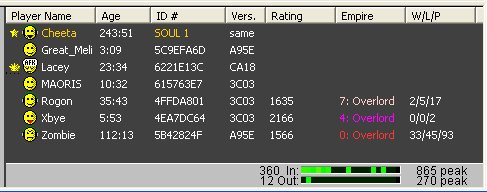
--
-- TA_OnPlayerInfoNeeded
provides two purposes. It lets you specify the
name of the column, and its width in
-- pixels. It also lets you specify the text (and
color) of the column entry for a specific player
serNum
--
-- TurnAbout will call YOU
when it is ready for this information. If you know the text
should change
-- (for example, new score information is
available), then call TA_UpdatePlayerInfo( serNum ) to let
TurnAbout
-- know it needs to ask you for the information
the next time it is convenient to do so.
--
-- Your columns are numbered starting with 0, and
you will be asked about each possible column in
turn.
-- If you return an empty string for the column
label, then that column will not be created
(note: you are
-- only given one chance to define your columns,
this will happen just after your script is
loaded. So
-- you must be immediately prepared to provide
your column definitions.
--
-- You are adding columns in addition to the
default arcadia columns, so in the example above,
your columns
-- begin just after the "Vers." column.
So "Rating" is column 0,
"Empire" is column 1, etc.
--
-- Arguments:
--
-- * SerNum of the player whose
'row' of the table you are to provide information
about.
-- If this serNum is 0, then you are being asked
for the column width and label
--
-- * Column Number (0 being your
first column)
--
-- Your Function Returns:
--
-- * column label For example:
"Score"
-- * width (in pixels) For
example: 60
-- * text (only used if serNum
~= 0) For Example: "1234 (winner!)"
-- * color (of the player's
text. Column label is always black) For Example:
"ff0000" <-- red
--
-- Now, I can see you thinking "I will ask
this to be repainted constantly and do some
color/text animation
-- and it will be cool!" Please don't do
that. It will flicker.
--
function TA_OnPlayerInfoNeeded(
serNum, col )
if( col
== 0 ) then
--
column 0 is my style's RATING column
if( serNum == 0 ) then
--
just provide the label and with
information in general
return "Rating", 60,
"", ""
else
--
return the current rating of this
player
local score = GetCurrentRating(
serNum )
return "Rating", 60,
score, "00ff00" -- in
green
end
end
return "", 0, "",
"" -- for whatever reason, I do
not need or want this column
end
--------------------------------------------
-- TA_OnGetPlayerMenu( slot, serNum,
playerName )
-- TA_OnDoPlayerMenu( slot, serNum,
playerName )
--
-- This pair of events lets you add a few
additional commands to the
-- right-clickup popup menu in the arcadia player
list. The "Get" event
-- allows you to specify the text of the menu
command (if any) and whether
-- it should be checked or dimmed. The "Do"
event is your notification
-- that the user has selected your menu option
and you should now perform
-- it.
--
-- The "Get" event will be called once
for each possible 'slot'
-- and you should return the empty string ("")
for any slots you do not
-- wish to populate with a menu command.
--
-- Arguments:
--
-- * slot number (0 for the
first/top menu command)
-- * serNum of the player whose
row was right-clicked upon
-- * playerName (for your
convenience, the name of the player is also
provided)
--
-- Your Get Function Returns:
--
-- * command text For Example:
("Boot " .. playerName .. " from
server.")
-- * checked For Example: 1 (if
you want a check mark to appear next to the
command) 0, if not
-- * dimmed For Example: 1 (if
you want the menu entry to be 'dimmed')
--
function TA_OnGetPlayerMenu(
slot, serNum, playerName )
if (
slot == 0 ) then
-- I
have one menu command to offer the
moderator
if( TA_IsModerator( glMySerNum
) ) then
return
("Boot
" .. playerName .. "
from game!" ), 0, 0
end
end
return
"", 0, 0 -- this is not a menu
command from me
end
-- Your Do
function returns:
--
-- * validMenuCommand - return 1
if you expected this command, 0 otherwise.
--
-- Note that a dimmed menu item is not
necessarily a disabled menu item, so it is your
-- responsibility to ignore inappropriate
commands
--
function TA_OnDoPlayerMenu(
slot, serNum, playerName )
if( slot
== 0 ) then
--
slot 0 is the only menu option I
provide
-- and I only offer it to the
moderator, and not on myself
if( TA_IsModerator(
glMySerNum ) and (glMySerNum ~=
serNum ) ) then
--
Call some function to actually do
the work
BootPlayerFromGame( serNum )
end
end
-- this
is not a menu command I am supporting, so
let turnabout know I didn't do anything
return 0 -- this is not one of my menu
commands
end
--------------------------------------------------
-- TA_OnPlayerClick( serNum,
numClicks )
--
-- The user may from time to time click on a row
in the Arcadia Player list. This
-- event notifies you when that happens. You
might want to use this as a means to
-- select a particular player as.. oh.. a
target.. or show extra info.. or highlight
-- their position. Whatever. Including nothing
--
-- Arguments:
--
-- * serNum (serial number of
the player in that row -- they may not have
joined the game
-- so you need to consider whether they are a
player or a spectator
-- SerNum = 0 means they clicked in the area
outside actual player rows
-- (you might use that as a means to 'de-select'
whatever you selected before)
-- * numClicks This will be 1 or
2, indicating a single click or a double click
--
-- Note that right-clicks trigger the popup menu,
so they are not reported here.
-- Note also that double clicks open the Arcadia
Diary (you can't stop that) so
-- double click is not a very good 'special
command' indication to you.
--
-- Your Do function returns: nothing
--
function TA_OnPlayerClick(
serNum, numClicks )
if (
(serNum ~= glMySerNum) and (numClicks ==
1) ) then
SetCurrentTarget(
serNum )
end
end
-----------------
-- TA_OnPacket
--
-- When you use the TA_SendPacket()
service request to send a packet to one or more
-- players, this function will be called on the
PC of each player that receives that packet.
-- It merely passes along the arguments provided
in the original call to TA_SendPacket
--
-- Arguments:
--
-- * serNumSender: You are given
the serialNumber from which the packet was
received (often this will be
-- the moderator, and one of the num
values will be the serial number of the actual
player the packet
-- contains information about.
-- * nums and strs: You also get
the 4 numbers and three
-- string values which you included in the
original call to TA_SendPacket
--
-- Your Function Returns: nothing
function TA_OnPacket(
serNumSender, num1, num2, num3, num4, str1,
str2, str3 )
if (
TA_IsModerator( serNumSender ) ) then
-- I
only accept packets from the
moderator
if( num1 == 47 ) then
--
packet 47 is my 'pulled trigger'
packet and I keep the weapon type
in num2
-- and the intended target number
in num3
HandleTrigger( num2, num3 )
end
end
end
-----------------
-- TA_OnMouse
--
-- Called when the local player clicks the mouse
inside the main display window (above the chat)
-- The arguments tell you if it was a left or
right mouse event and whether the button was
being
-- pressed or released.
--
-- You are also given the x,y value (in pixels,
relative to the top/left corner of the main
display)
--
-- NOTE: You can use
TA_MouseLoc() to find the current location of the
mouse at any time.
--
-- Arguments:
-- You are given 4 numbers:
-- * buttonId (0 = left mouse button, 1 = right
mouse button)
-- * clickType ( 0 = mouse UP, 1 = mouse DOWN )
-- * x,y Coordinares at which the mouse was
clicked
--
-- Your Function Returns: nothing
function TA_OnMouse(
buttonId, clickType, x, y )
if(
buttonId == 0 and clickType == 1 ) then
TA_Print(
"You just clicked on: " ..
x .. ", " .. y )
end
end
|
| Available TA_xxxx
Service Requests Your event handlers can
call external functions provided by TurnAbout to
carry out various actions on your behalf. Feel
free to suggest additional functions if you feel
there is a compelling need.
Unlike the Event
handlers, you do NOT provide function bodies for
these functions. They have been provided FOR you,
and you can just CALL them when you need to. The
documentation that follows is an example usage of
each function, but normally you would call these
functions from inside your own event handlers.
You do NOT have
to call ANY of these functions, if you do not
WANT to, but you probably do.
------------
-- TA_Log( text )
--
-- This function logs some boring text. Generally
intended to help you debug your program. You can
-- not specify font size or color. It is added to
the 'funpack' log window, and also to the main
chat
-- window.
--
-- Since you have no single-stepping debugger
available to you, you will need to use this
function
-- to understand what is going wrong when your
script stops working. This involves peppering
your
-- script with TA_Log() messages which let you
know which functions got called and what
arguments
-- were passed to them, or anything else which
would help you understand what the problem is.
--
-- Arguments:
-- You provide a string you would like to have
logged
--
-- Values Returned To You: none
--
-- Example Usage:
TA_Log(
"I am about to do something that might
crash and would like to document how far I
made it" )
------------
-- TA_IsModerator( serNum )
--
-- This function checks a serial number for you
and returns nil (false) if it is NOT the serial
-- number of the current moderator. Remember, in Lua 0
is true (not
false!) Only nil is false.
--
-- Arguments:
-- You provide a number: the serial number you
would like to check.
--
-- Values Returned To You: nil (false) or 1 (true)
--
-- Example Usage:
if ( TA_IsModerator(
serNum ) ) then
TA_Log(
"hey, serNum " .. serNum ..
" *is* the moderator, I should obey
him!" )
end
------------
-- TA_SendPacket( to, num1, num2, num3,
num4, str1, str2. str3 )
--
-- This function sends a packet to one or more
players in the game. The num and
-- string arguments will be delivered to the
targeted players via the TA_OnPacket
-- event handler when the packet arrives on their
PC.
--
-- Arguments:
-- You provide a 'to' number which indicates who
will receive the packet:
-- * 0 means "send to all players"
-- * -1 means "send just to the
moderator" (which assumes you are NOT the
moderator)
---- anything else is assumed to be a player
serial number and only that player gets the
packet
-- Also, you provide 4 nums, and three strings,
which will be delivered to the
-- targeted players.
--
-- NOTE: While strings may
contain any ascii you like, they must be
relatively short (say
-- around 100 characters each maximum). The nums
are integers and must be in the
-- range +/- 2 billion. If you need to send a
floating point value, either send it as a string,
-- or use some special trick, like "123 in a
num really means 1.23 and I will divide the value
by 100
-- when I receive it". If you don't NEED a
num, use 0, and if you don't NEED a string,
use ""
--
-- NOTE: You never receive a
packet that you sent yourself. Often you will
want to pretend you
-- did, so as to stay synced to the other
players.
--
-- Values Returned To You: none
--
-- Example Usage:
TA_Log(
"I will sent my birthday to the
moderator" )
TA_SendPacket( -1, 11, 2,
2004, 0, "Billy", "Was
Born", "" )
------------
-- TA_IsKeyDown(
virtKeyCode )
--
-- This function checks to see if the user is
currently holding down a particular keyboard key
(or
-- mouse button). You need to know the Microsoft
"Virtual Key Code" for the keyboard key
you want.
--
-- Arguments:
-- You provide the virtual key code for the key
you care about. Please note this is NOT the ASCII
-- Value of the character on that key, and that
some keys have different virtCodes depending on
if
-- they are on the main keyboard or the numpad,
etc. Good Luck finding the key codes! Use Google!
--
-- Values Returned To You:
-- returns 1 (true) if the key is DOWN, and nil
(false) if it is UP.
-
-- Example Usage:
TA_Log(
"I wonder if they are holding down the
F5 Key right Now" )
if( TA_IsKeyDown( <keyNum
for F5> ) ) then
TA_Log(
"Why yes, they are!" )
end
And here is a
list of popular Virtual Key Codes: (um,
translated to DECIMAL since that is what lua
wants)
| 1 -
Left mouse button |
37 -
LEFT |
96 -
numpad 0 |
| 2 -
right mouse button |
38 - UP |
105 -
numpad 9 |
| 16 -
shift key |
39 -
RIGHT |
112 -
F1 |
| 17 -
ctrl Key |
40 -
DOWN |
113 -
F2 ... |
| 27 -
ESCape |
45 -
INSERT |
|
| 32 -
SPACE |
46 -
DELETE |
|
| 33 -
PgUp |
48 -
"0" |
|
| 34 -
PgDn |
47 -
"9" |
|
| 35 -
END |
65 -
"A" |
|
| 36 -
HOME |
90 -
"Z" |
|
The
full list (in HEX) can be found here (had to
break url in two to make it fit!):
http://msdn.microsoft.com/library/default.asp?
url=/library/en-us/winui/WinUI/WindowsUserInterface/UserInput/VirtualKeyCodes.asp
NOTE: At
present, this still works even when turnAbout is
not the foreground window.. so if you bring
notepad to the front and start typing in it, your
mini-game will continue to react to the
keystrokes. I may or may not remove that
'feature'
------------
-- TA_Print( text )
--
-- This function prints text to the chat window,
and allows you a little bit of stylistic control
-- over its appearance (font name, color, size
and bold, italic, and underline).
--
-- Arguments:
-- You provide a string with the text you want
added to the chat window. Angle brackets can be
-- used to indicate simple font decoration
--
-- Values Returned To You: none
--
-- Example Usage:
TA_Print(
"Dear <b>Player</b>, I
<i>love</i>
<color=FF0000><size=200>YOU"
)
Will display:
"Dear Player, I love
YOU"
The special font
decorations are:
// usage:
TA_Print( string )
// Supports special tokens:
// <b> bold </b>
// <i> italic </i>
// <u> underlined </u>
// <size=90> (font size, 90 is normal size,
250 is so large as to be less than useful)
// <font=name> (font name, who knows what
happens if they don't have the font.. something
ugly)
// <color=RRGGBB> (in hex, like a web page,
but no quotes)
------------
-- TA_MouseLoc( )
--
-- This returns the location of the mouse cursor,
in pixels, relative to the top left corner of the
-- main graphical display area.
--
-- (0,0) is top left corner, (width, height) is
lower right corner
--
-- NOTE: Use the TA_OnMouse()
event for real time notification of mouse button
clicks
--
-- Arguments: none.
--
-- Values Returned To You:
-- You are given two numbers, the x and y, in
pixels. Note that you must have
-- two variables ready to receive the result.
--
-- Example Usage:
-- Now,
WHERE is that Mouse cursor?
-- we need TWO variables to receive the
results.
local x
local y
x, y = TA_MouseLoc(
)
------------
-- TA_MaxPlayerSlots()
--
-- This function returns 8, the max number of
players supported by TurnAbout. You
-- should act surprised each time you call it,
like mayber someday it will say something else.
-- It probably won't.
--
-- Arguments: none
--
-- Values Returned To You: 8
-- Well, ok, returns the maximum number of player
slots. You can then interate from 1 to this
-- number to get information about each slot.
--
-- Example Usage:
local
numSlots = TA_MaxPlayerSlots()
for i=1, numSlots do
end
------------
-- TA_NthPlayerSlot( n )
--
-- Provides information about a given player slot
Remember that Lua counts from 1, not zero
-- so N is a legal max value
--
-- Arguments:
-- You provide a value of N between 1 and
TA_MaxPlayerSlots (8), inclusive
--
-- Values Returned To You:
-- This function returns THREE values to you, two
numbers and a string, in the order:
---- slotState, serNumOfPlayerInSlot,
ArcadiaNameOfPlayerInSlot
--
-- NOTE: an empty slot will have
a slot state and sernum set to 0. a state value
of 1
-- means it is a human player, while a state of 2
is a bot. (bots have negative serNums
-- which imply which bot brain is in use)
--
-- Example Usage:
local
numSlots = TA_MaxPlayerSlots()
local state
local serNum
local name
for n=1, numSlots do
state,
serNum, name = TA_NthPlayerSlot(
n )
TA_Print( "Slot
" .. i .. ", is in state "
.. state .. ", with sernum "
.. serNum .. ", and name: " ..
name)
end
------------
-- TA_PlayerName( serNum
)
--
-- Sometimes you want the ArcadiaName of a
player, and you only have their serial number.
--
-- Arguments:
-- You provide the serial number of a player.
--
-- Values Returned To You:
-- You are given their name, as a string
--
-- NOTE: It can only look up the
name of players who are there right now.
--
-- Example Usage:
local serNum
= 47
local name = TA_PlayerName(
serNum )
TA_Print( "Hello,
" .. name .. ", did you know your
serNum was " .. serNum .. "?"
)
------------
-- TA_UpdatePlayerInfo( serNum
)
--
-- Say you have reason to believe that the
PlayerInfo columns need to be updated (see
-- the TA_OnPlayerInfoNeeded event for details).
Use this function to tell TurnAbout/Arcadia
-- to refresh one or more lines of that list box.
--
-- Note: a serNum value of zero will cause all
rows to be updated. Otherwise only the row
-- for the player serNum you specify will be
updated. This will update all columns of that
row.
--
-- Arguments:
-- You provide the serial number of a player, or
0 for 'all players'.
--
-- Values Returned To You: none
--
--
-- Example Usage:
UpdateAllScores()
-- say this updates some lua tables
-- Ask TurnAbout to refresh the player list.
-- In response to this, I will get a call on
my TA_OnPlayerInfoNeeded event
TA_UpdatePlayerInfo( 0 )
------------
-- TA_NumCards(
propertyName, propertyValue )
--
-- A Turnabout game is always launched using the
moderator's "deck" which has some
-- number of cards in it. These cards then have
properties which can be used to save
-- and load data into the script.
--
-- This function can either tell you how many
cards are in the deck total, or just how
-- many cards there are with a particular
property setting
--
-- Arguments:
-- You provide a property name and value (both
are strings) which is used to 'filter out' cards
that
-- do not have that setting on them. If you want
ALL the cards, use "" for the
-- property name and value.
--
-- Values Returned To You:
-- You are given a number which tells you how
many cards are in the deck with that
-- property value.
--
-- Example Usage:
local
numCardsInDeck = TA_NumCards(
"", "" )
local numSpecial = TA_NumCards(
"Special", "true" )
TA_Print( "while there
are " .. numCardsInDeck .. " cards
in the deck, only "
.. numSpecial .. "are special." )
NOTE:
There is no standard property called
"Special." This was just an example. As
the deck style creator, you define what
properties your cards have.
------------
-- TA_NthCardId( n, propertyName,
propertyValue )
--
-- After calling TA_NumCards(), you can use a
value of N between 1 and that returned value
-- to get the 'cardId' of the Nth card in the
deck. Note that you should provide the same
-- property name and value to TA_NthCardId() as
you did to TA_NumCards() for it to make
-- any sense.
--
-- Arguments:
-- In addition to the property name and value to
be used as a filter (see TA_NumCards()), you
-- also provide a value of N which should be
between 1 and TA_NumCards() (inclusive)
--
-- Values Returned To You:
-- You will be given a string cardId (looks
something like like "00000001_23")
which identifies the
-- card at that position in the (filtered) deck.
If you provide a bad value of N, then you will
get nil,
-- so you should probably check for that.
--
-- Example Usage:
local cardId
= TA_NthCardId( 4,
"Special", "true" )
if ( cardId ) then
TA_Print(
"I guess 4 was a legal value for
N" );
end
------------
-- TA_GetCardProperty( cardId, propertyName )
--
-- Given a cardId and property name (both are
strings), it will return the current value of
-- that property on the specified card in the
current game deck. This is not necessarily
-- synchronized for all players (unless you send
packets to keep it synchronized)
--
-- Arguments:
-- You provide the cardId (probably from
TA_NthCardId() and property name you care about.
--
-- Values Returned To You:
-- You are given the (string) value of that
property. Or nil if no such card or property
exists.
--
-- Example Usage:
local
numMonsters = TA_NumCards(
"type", "monster" )
for n=1,numMonsters do
local
cardId = TA_NthCardId(
n, "type", "monster"
)
local monsterName = TA_GetCardProperty(
cardId, "Name" )
TA_Print( "Monster
#" .. n .. " has the name:
" .. monsterName )
end
NOTE:
"type" and "Name" are not
necessarily standard card properties (ok NAME
is!) and are used here purely as an example. For
example, a game where you define a type of card
to represent a monster.
------------
-- TA_SetCardProperty(
cardId, propertyName, propertyValue )
--
-- This lets you change the value for a property
on a card in the deck. This only affects
-- the temporary copy of the deck used in the
game, and does not permanently alter
-- properties of the moderator's starting deck.
--
-- Arguments:
-- You provide a cardId, a property Name, and a
property Value
--
-- Values Returned To You: none
--
-- Example Usage:
-- This
monster is a doofus!
TA_SetCardProperty( cardId,
"Status", "Doofus" )
-- And also, it's dead!
TA_SetCardProperty( cardId,
"RemainingHitPoints", "0"
)
NOTE:
Changing a card property only happens on the PC
which executes the lua script which makes it
happen. Unlike WoS, however, all players have a
copy of the script and have their event handlers
called for the same reasons. Hence you might need
to send packets to keep properties in sync, if
you care. Usually your game will have most of the
logic take place on the moderator's PC only.
In such a case,
when you decided the monster was a doofus, you
would probably send a packet to all players which
implied that, and then the event handler on each
player's PC would locally set the property on
their own copy of the deck.
------------
-- TA_SetState(
stateNumber )
--
-- This lets you command TurnAbout to start some
important state or substate. This really needs
more
-- documentation than shown here.
--
-- Arguments:
-- You provide a new state value:
-- * 0 - Stop the Game (this is suicide, your
script is unloaded, state returns to PICK DECK)
-- * 1 - Join Game (have the current player add
themselves to the Join Game list..)
-- * 2 - Start Game (moderator only), end the
JOIN GAME state and start the game proper
-- * 3 - No State Please (for example, shuts off
the roll dice message which otherwise hangs
forever
--
-- Values Returned To You: none
--
-- Example Usage:
-- Game over
dude, game over!
TA_SetState( 0 )
------------
-- TA_GetMsec( )
--
-- Fetches the current msec value (using the same
clock as used in the TA_OnTick event. Just
-- in case you need to know. Remember: no fair
looping until some future msec. You MUST return
-- from your functions as quickly as possible or
you will block the game.
--
-- Arguments: none
--
-- Values Returned To You: current msec value
--
-- Example Usage:
-- what msec
is it RIGHT NOW?
local msec = TA_GetMsec(
0 )
|
| Graphics Services So, you want to write a
game which looks as amazing as
Warpath, Well of Souls, or Empyrion? (i.e. 256
color 2D), well then here is the graphics support
library for YOU! (Um, that was supposed to be
sort of tongue and cheek.)
All drawing
(rendering, painting, whatever) is done to
"Image Buffers" and each image buffer
is identified by a unique handle
value. Handle zero is the 'main screen' (the area just above the
chat window) and is the only image buffer seen by
the user. Your job is to fill that image buffer
with appropriate graphic goodness, given the
primitive 2D, 256 color, rendering commands which
follow.
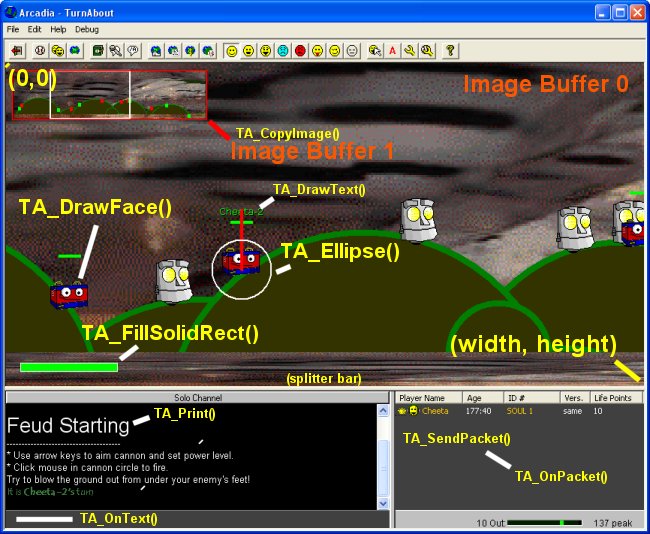
First, however,
you must tell TurnAbout that you are interested
in being "THE" renderer for your game,
so somewhere in your script you must
first call TA_SetRenderMode( 1 ) once. (You only have to call
it again when you want it to change)
After that, you
can render directly to Image Buffer 0 (it won't
ever flicker, there is yet another layer of
buffering before it is really seen by the user)
or render to extra Image Buffers that you create
and then copy those image buffers to the main
screen (sprite animation, for example).
------------
-- TA_SetRenderMode( mode
)
--
-- The display window above the chat area can be
rendered in one of several modes. More
-- modes later, I hope.
--
-- Call this function once in your TA_OnLoaded()
handler (you can call it at any time you
-- like, of course). TurnAbout will immediately
switch to the mode you select
--
-- Arguments:
-- You provide a mode:
-- * 0 - default (TurnAbout Draws what it likes)
-- * 1 - custom (Nothing is drawn except what
your script draws)
--
-- Values Returned To You: none
--
-- Example Usage:
function TA_OnLoaded(
serNum, modSerNum, width, height )
-- My
Game wants to control the graphical
display area completely!
TA_SetRenderMode( 1 )
end
------------
-- TA_FillSolidRect(
handle, left, top, right, bottom, color )
--
-- You would probably be shocked if you knew how
often I draw rectangles. This is your basic
building
-- block. This function draws a solid color
rectangle (quickly) at the pixel coordinates you
specify in the
-- image buffer you specify. Use the
TA_GetImageSize() function if you have forgotten
the dimensions
-- of you Image Buffer.
--
-- Arguments:
-- You provide a handle, 4 numbers defining a
rectangle, and a color (see TA_Print() for
color format)
-- NOTE: Here the 4 rectangle values are provided
as individual numbers, not as a table
--
-- Values Returned To You: none
--
-- Example Usage:
-- draw a
red rectangle on the main screen
TA_FillSolidRect( 0, 20, 20,
200, 150, "ff0000" )
------------
-- TA_LineTo(
handle, x, y, width, color )
--
-- This lets you draw a straight line of the
given color to the x,y position (in pixels) of
your choice
-- use a line width of 0 to achieve 'move to'
(not actually draw anything, just get the pen to
-- that point).
--
-- Arguments:
-- You provide a handle, x, y, width of the line
(in pixels) and a color.
--
-- Values Returned To You: none
--
-- Example Usage:
-- Draw a 4
pixel thick green line going from NW to SE
-- First we 'move to' (width = 0) the
starting position
TA_LineTo( 0, 10, 10, 0,
"" )
-- Then we 'draw to' the end point
TA_LineTo( 0, 100, 100, 4,
"00ff00")
------------
-- TA_DrawText(
handle, dstRect, text, fontName, fontSize,
shadowSize, color, flags )
--
-- This lets you paint some text on the screen at
some position. Note that this is different
-- from using TA_Print() to add text to the chat
window. This text goes in the graphics
-- area. This function does not
support the <b>, <i> etc code words in the text.
--
-- Arguments:
-- You provide a handle, destination rectangle,
the text, the font name and size, a shadow
-- size (0 for no shadow, 1 for text just above
the screen), the text color, and flags.
--
-- The flags are the same values as used by the
windows DrawText command and someday
-- I will enter the more interesting ones here
(singleline, left, right, top, bottom centered,
etc.)
--
-- Values Returned To You: none
--
-- Example Usage:
-- We make a
rectangle to draw the text inside of
-- always { left, top, right, bottom }
local rect = { 10, 10, 200, 40 }
-- now some yellow words of happiness
TA_DrawText( 0, rect,
"Hello, buttercup!",
"arial", 90, 1, "ffff00",
0)
Note we will use
the 'rectangle array' a lot (but not in
TA_FillSolidRect() ) and you can think of it as
being { left, top, right, bottom } or { x1, y1,
x2, y2 } identifying the top left and lower right
corners of a rectangle. I should probably point
out that (0, 0) is the coordinate of the upper
left corner of and image buffer and that
(width-1, height-1) is the corner of the pixel
just inside the bottom right corner. In general,
you can specify coordinates outside the range of
the image buffer and nothing too awful will
happen. But you are encouraged to draw within the
lines all the same :-)
Here are some
popular FLAG values. Add them together to get the
effect you want: (0 means Top, Left, multiline)
| 1 -
Center |
16 -
wordbreak |
| 2 -
Right |
32 -
singleline |
| 4 -
vcenter (requires singleline) |
256 -
noclip |
| 8 -
bottom (requires singleline) |
|
So, for example:
1 + 4 + 32 = 37 means "horizontally and
vertically centered inside the rectangle, with no
line breaks"
------------
-- TA_Ellipse(
handle, rect, filled, fillColor, lineWidth,
lineColor )
--
-- This function renders an ellipse whose outer
perimeter is bound by the rectangle. If the
-- rectangle is a square, then the ellipse is a
circle.
--
--
--
-- Arguments:
-- * handle of the Image Buffer in which to draw
it
-- * rectangle {left, top, right, bottom} which
defines the edges of the oval
-- * filled (1 if you want a solid color filling
the inside, 0 if you want it 'empty' )
-- * fillColor (color with which to fill the oval
if filled = 1)
-- * lineWidth (width in pixels of the line
around the outside of the oval. 0 for no line)
-- * lineColor (color of the line around the
outside of the oval)
--
-- Values Returned To You: none
--
-- Example Usage:
-- Draw a
filled red circle with a 5 pixel thick black
line around it
TA_Ellipse( handle, {30, 30,
230, 230}, 1, "ff0000", 5,
"000000" )
------------
-- TA_Polygon(
handle, numPts, pts, filled, fillColor,
lineWidth, lineColor )
--
-- This function renders a polygon by connecting
together the points you give it, in order
-- You must provide at least 3 points (a
triangle)
--
--
--
-- Arguments:
-- * handle of the Image Buffer in which to draw
it
-- * the number of points in your 'pts' list
-- * a lua array of point data in the form {x1,
y1, x2, y2, x3, y3, .... }
-- * filled (1 if you want a solid color filling
the inside, 0 if you want it 'empty' )
-- * fillColor (color with which to fill the
polygon if filled = 1)
-- * lineWidth (width in pixels of the line
around the polygon. 0 for no line)
-- * lineColor (color of the line around the the
polygon)
--
-- Values Returned To You: none
--
-- Example Usage:
-- Draw a
filled red triangle with a 5 pixel thick
black line around it
local cx = 100
local cy = 100
local points = { cx, cy, cx+100, cy+100,
cx-100, cy+100 }
TA_Polygon( handle, 3,
points, 1, "ff0000", 5,
"000000" )
------------
-- TA_CreateImage( width, height,
colorIndex )
--
-- This function creates a new Image Buffer and
returns its handle. You can then use the
-- drawing commands to render pictures into this
new Image Buffer (which is not seen by anyone
until
-- you use the TA_CopyImage() or
TA_StretchImage() commands to move it to the main
screen)
--
-- handle 0 is always the main screen.
--
-- NOTE: It is YOUR responsibility to
eventually call TA_DestroyImage( handle ) to get rid of this
-- image buffer when you no longer need it. You
probably will want to keep the handles in global
-- variables, not local ones, since you will need
them later.
--
-- Image Buffers are always 256 color (using the
official Synthetic Reality 256 color palette) and
-- this command lets you specify which of those
colors with which to initially fill the sheet.
--
-- Arguments:
-- You provide a width and height (in pixels) for
your new Image Buffer, and the index of the
starting
-- color from the 256 color palette. The buffer
will start life filled completely with this
color.
--
-- Values Returned To You:
-- You are given the 'handle' to use in
subsequent painting calls to this image buffer.
If you get a
-- negative handle, then it was not possible to
create your buffer (it was too big, or you are
out
-- of memory -- are you leaking handles?)
--
-- Example Usage:
-- Create a
new image buffer sized 256 x 256 and
pre-filled with black
handle = TA_CreateImage(
256, 256, 0 )
-- Draw some yellow text in it
-- Note than no one can see this yet
TA_DrawText( handle,
{0,0,256,256}, "Hello!",
"Arial", 90, "ffff00", 0)
------------
-- TA_DestroyImage( handle
)
--
-- This function destroys (releases memory used
by) an image buffer you previously created
-- with the TA_CreateImage()
function. You cannot destroy the main screen
(handle = 0),
-- but you are encouraged to destroy every sheet
you create.. say, at the end of the game.
--
-- Arguments:
-- You provide the handle of the sheet you would
destroy.
--
-- NOTE: once you destroy it,
it's gone, no fair using it any more!
--
-- Values Returned To You: none
--
-- Example Usage:
-- Make a
new Image Buffer
handle = TA_CreateImage(
100, 100, 0 )
-- I changed my mind, I don't want it any
more
TA_DestroyImage( handle )
------------
-- TA_LoadImage(
handle, filename )
--
-- This function loads a 256 color RLE-encoded
bitmap (or jpeg) into the specified Image Buffer.
Colors
-- will be coerced to the 256 color Synthetic
Reality palette. The Image Buffer will also be
RESIZED to
-- match the dimensions of the picture you
loaded. (ergo, the size you specified in TA_CreateImage
will
-- no longer be valid. Use TA_GetImageSize()
if you need to know the new size)
--
-- NOTE: The image will exactly
fit the buffer with no squishing (since the
buffer changed dimensions to
-- match the picture)
--
-- Arguments:
-- You provide a handle to a buffer created with TA_CreateImage()
and the name of the file to load.
-- FileNames are somewhat problematic at the
moment, and may change, but will probably look
something
-- like: assets/styles/<your serial
number>/styleName/filename.jpg
--
-- NOTE: For security purposes,
you will not be able to load images outside of
the toy10 folder.
--
-- Values Returned To You: none
--
-- Example Usage:
-- Make an
Image Buffer.. size is not important, but 0x0
is not allowed
handle = TA_CreateImage( 1,
1, 0 )
-- Now fill it with a picture
TA_LoadImage( handle, "assets/styles/00000001/styleName/Images/marigolds.bmp" )
If you only need
assets from inside your current style folder, you
can use this shortcut:
"./Images/marigolds.bmp"
------------
-- TA_EraseImage(
handle, colorIndex )
--
-- Often you will want to begin your rendering by
erasing the previous image. This function
-- quickly fills the Image Buffer with a single
color, specified as 0-255 (the index of that
color)
-- in the official Synthetic-Reality palette.
--
-- Arguments:
-- You provide a handle and a colorIndex (0-255)
--
-- Values Returned To You: none
--
-- Example Usage:
-- Make an
Image Buffer.. size is not important, but 0x0
is not allowed
handle = TA_CreateImage( 1,
1, 0 )
-- Now fill it with a picture
TA_LoadImage( handle,
"./marigolds.bmp" )
-- Oh, I changed my mind, make it all some
solid color
TA_EraseImage( handle, 46 )
-- Note: only stupid people would do this,
since it totally wasted everyone's
-- time.. other than I guess it is a way to
get the Image Buffer to match the
-- size of a picture.
------------
-- TA_CopyImage(
dstHandle, srcHandle, dstX, dstY, srcRect,
transIndex, effect, flip)
--
-- This function copies a subset of the 'source'
Image Buffer to some location in the
-- 'destination' Image Buffer. You will use this
a lot to copy pieces from your extra Image
-- Buffers to the main screen buffer( handle 0).
--
-- This is, for example, how you will add
'sprites' to the screen
--
-- Arguments:
-- You provide the source and destination Image
Buffer handles. The source rectangle
-- identifies how much of the source picture you
want to copy (it might be a filmstrip
-- containing different 'poses' of your object
and you might want to copy just one frame
-- as opposed to the whole thing. If you want to
copy the whole source image, use 'nil'
-- for the rectangle.
--
-- The destination x and y values are where the
top left corner of the
-- source rectangle will be placed in the
destination Image Buffer.
--
-- The transparentIndex lets you specify one of
the 256 colors of the pallete as being
'transparent'
-- and the destination image buffer will not be
overwritten by pixels of that color.
Traditionally
-- index 6 (aqua) is used for that purpose.
--
-- The effect value does various undocumented
things, and the flip value allows you to reverse
-- the image left/right as it is being copied.
--
-- NOTE: only this function can
render an image with 'transparent outline' and
this function
-- can NOT be used to 'stretch' an image to a
different size. If you need to do both, you
-- probably need to make an extra Image Buffer
which holds the stretched image, and then
-- use TA_CopyImage to copy the
stretched version to the main screen
--
-- Values Returned To You: none
--
-- Example Usage:
-- Make an
Image Buffer.. size is not important, but 0x0
is not allowed
handle = TA_CreateImage( 1,
1, 0 )
-- Now fill it with a picture
TA_LoadImage( handle,
"./marigolds.bmp" )
-- Now copy it to (x, y) on the main screen,
where it can be seen. The whole source image
TA_CopyImage( 0, handle, x,
y, nil, 6, 0, 0 )
Now, you budding
animators, don't even THINK of doing this:
for
x=0,100,2 do
-- Walk
across the screen!
TA_CopyImage( 0, handle,
x, y, nil, 6, 0, 0)
end
Sure it LOOKS
like it might work, but the thing is that NOTHING
you draw can be seen until AFTER you return from
your event handler, so you will just waste time
doing all that drawing (plus you didn't erase the
previous screen buffer!) TO have your sprite move
across the screen, you need something more like
this:
TA_OnLoaded(
.... )
--
Things we only need to do once:
-- Make an Image Buffer.. size is not
important, but 0x0 is not allowed
-- Be sure handle is 'global'
spriteHandle = TA_CreateImage(
1, 1, 0 )
-- Now fill it with a picture
TA_LoadImage(
spriteHandle, "./marigolds.bmp"
)
end
TA_OnTick(
msec )
-- Erase
the previous screen (to black)
TA_EraseImage( 0, 0 )
-- make x wrap between 0 and 300 every 3
seconds
local x = math.mod( msec/10, 300 )
local y = 0
TA_CopyImage(0,
spriteHandle, x, y, nil, 6, 0, 0 )
end
------------
-- TA_StretchImage(
dstHandle, srcHandle, dstRect, srcRect )
--
-- This function copies some portion of a source
image onto some portion of a
-- destination Image Buffer, stretching the image
as needed in the process. It
-- can NOT do transparent edges (Use TA_CopyImage()
for that).
--
-- NOTE: Stretching
never makes a picture look better. Start with art of the
-- correct size, whenever possible.
--
-- Arguments:
-- You provide source and destination Image
Buffer handles, and source and destination
-- rectangles to indicate which portion of the
buffers to use. a nil rectangle means 'use the
-- entire buffer'
--
-- Values Returned To You: none
--
-- Example Usage:
-- Make an
Image Buffer.. size is not important, but 0x0
is not allowed
handle = TA_CreateImage( 1,
1, 0 )
-- Now fill it with a picture
TA_LoadImage( handle, "./marigolds.bmp" )
-- Now copy a 40 x 40 piece of the marigolds
to the main screen, filling the
-- entire screen with just that bit of the
picture
TA_StretchImage( 0, handle,
nil, {10, 10, 50, 50} )
------------
-- TA_GetImageSize( handle
)
--
-- This returns the width and height of the Image
Buffer. Note that the TA_LoadImage()
command
-- can result in the size changing from what you
declared in the TA_CreateImage()
function.
--
-- Arguments:
-- You provide the handle of an Image Buffer
whose size you need to know.
--
-- Values Returned To You:
-- You are given two numbers, the width and
height, in pixels. Note that you must have
-- two variables ready to receive the result.
--
-- Example Usage:
-- Make an
Image Buffer.. size is not important, but 0x0
is not allowed
handle = TA_CreateImage( 1,
1, 0 )
-- Now fill it with a picture
TA_LoadImage( handle,
"./marigolds.bmp" )
-- Now, how BIG was that picture anyway?
-- we need TWO variables to receive the
results.
local width
local height
width, height = TA_GetImageSize(
handle )
------------
-- TA_GetPixel(
handle, x, y )
--
-- I hesitate to include this and SetPixel since
they are horribly inefficient ways in which to
-- render images. Still, you will occasionally
need them, if only to get the top left pixel of a
-- Well of Souls image to figure out which color
index should be used for transparency.
--
-- This function peeks at the pixel at the
position you specify and returns its color index
to
-- you (0-255, the index into the Synthetic
Reality Palette)
--
-- Arguments:
-- You provide the handle of an Image Buffer and
the x, y coordinates of the pixel in question.
--
-- Values Returned To You:
-- You are given one number: the current
colorIndex of that pixel.
--
-- Example Usage:
-- Make an
Image Buffer.. size is not important, but 0x0
is not allowed
handle = TA_CreateImage( 1,
1, 0 )
-- Now fill it with a picture
TA_LoadImage( handle,
"./marigolds.bmp" )
-- Now, what color index is in the top left
pixel? That is probably the transparent
-- background color index
local colorIndex = TA_GetPixel(
handle, 0, 0 )
------------
-- TA_SetPixel(
handle, x, y, colorIndex )
--
-- This is not fast. Use it sparingly. This
function sets one tiny little pixel to the color
index
-- you specify. A single image has thousands or
millions of pixels. Setting them one by one is
silly!
--
-- Arguments:
-- You provide the handle of an Image Buffer, the
(x,y) coord of a pixel, and its new color index
(0-255).
--
-- Values Returned To You: none
--
-- Example Usage:
-- Make an
Image Buffer.. size is not important, but 0x0
is not allowed
handle = TA_CreateImage( 1,
1, 0 )
-- Now fill it with a picture
TA_LoadImage( handle,
"./marigolds.bmp" )
-- Destroy the artists vision by plugging a
random color pixel in there
TA_SetPixel( handle, 10, 23,
255 )
------------
-- TA_DrawFace(
handle, dstRect, serNum, frame, flags )
--
-- Every Arcadia Player has a 'face' which they
picked. You should generally use this as
-- the token to represent the player when you
can. These faces can have 8 different 'emotions'
-- associated with them. This function lets you
render a player's face, using either the emotion
-- frame of YOUR choice, or the frame THEY have
currently selected for themselves.
--
-- Arguments:
-- You provide a handle, a destination rect which
will receive the face image (faces are 60 x 68
pixels
-- in size, so if you provide a different size or
shape, the face will be stretched to fit)
--
-- You identify the player in question by their
serial number (and you can only render faces of
people
-- who are currently on the server).
--
-- You can specify the frame number (0-7) or use
-1 to mean "use the player's current
emotion."
--
-- At present, flags are undocumented. Use 0.
--
-- Values Returned To You: none
--
-- Example Usage:
-- Draw
Their Face on the Main screen at x,y
TA_DrawFace( 0, { x, y,
x+60, y+68 }, serNum, -1, 0 )
|
| Sound Support You might want your
mini-game to make some sounds now and then. The
supported sound formats are:
- WAV
.wav files are simple sound effect files
and are expected to be brief. These files
get large in a hurry if they are long,
stereo, high sample freq, or large sample
size. (I.e. everything that makes them
sound GOOD also makes them HUGE). I claim
huge is bad, so I try to keep my own
sound effects to 10K bytes or less, using
11KHz, mono, 8-bit sampling. You can play
multiple .WAV files at the same time,
though if you play a particular one (say
"dogbark.wav") while it is
already playing, it will restart from the
beginning (you won't hear two copies of
"dogbark" playing at the same
time. But you COULD hear
"dogbark1.wav" and
"dogbark2.wav" at the same
time.
- MID
.mid files are a special form of music
file (they are NOT .mp3 recordings of
actualy musicians, they are more like the
player piano roll of paper. They just
containing the timing information for
when a note should be played. They leave
it up to the piano to actually make the
sound.) Anyway, they are small and good
for background music. Only one .MID file
may be playing at a time (and starting
one will kill any in progress)
You are
responsible for organizing your sound files
within your style folder, but you might want to
make subfolders like:
assets/styles/<yourSerNum>/<yourStylName>/sfx
assets/styles/<yourSerNum>/<yourStylName>/midi
-----------
-- TA_PlayWAV(
filename )
--
-- Plays the sound effect that you specify
--
-- Arguments:
-- You provide the filename of a .wav file (you
should include the .wav extension)
--
-- Values Returned To You: none
--
-- Example Usage:
-- My dog
should bark now
TA_PlayWAV(
"./sfx/woof.wav" )
-----------
-- TA_PlayMIDI(
filename )
--
-- Starts the music playing that you specify
--
-- Arguments:
-- You provide the filename of a .mid file (you
should include the .mid extension)
--
-- Values Returned To You: none
--
-- Example Usage:
-- Play
exciting fight music
TA_PlayMIDI(
"./midi/mortalcombat.mid" )
I may or may not
support an optional second argument "0"
or "1" which would enable 'looping' the
song over and over again. I do not claim that
works here. But you might try. I might sneak it
in.
To STOP music
from playing, try TA_PlayMIDI(
"" )
|
| Playing Card Support So, sure, TurnAbout can
handle multiple hierarchical classes of decks of
cards with emergent properties, but you
just want to make a poker game. What can you do?
Never fear,
TurnAbout comes with the boring old normal
playing cards built in. TurnAbout will shuffle up
a deck (or several) and deal them out for you on
demand. A Playing card (or stock card) in this
context is defined as a pair of numbers. These
can be thought of as the row and column of the
card you want, in this graphic:
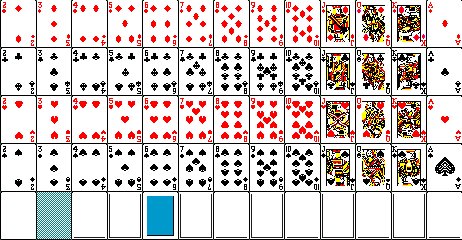
So, for example,
the King of Hearts is row 2, column 11. (note
that we start with 0 in this case, unlike lua's
penchant for starting with 1)
The fifth row is
reserved for special things like halftone filters
and card backs.
Decks of
Playing Cards
This is probably
confusing since I just drilled into you what a
TurnAbout 'deck' was, and this isn't that. This
is a conventional deck of playing cards.
TurnAbout provides functions to let you shuffle a
deck of 52, 104, 156, or 208 cards, and then pull
them out of the deck one by one.
This has nothing
to do with the rendering of the cards, just the
management of a randomized deck of (row,col)
pairs.
-----------
-- TA_StockCardsInfo( )
--
-- returns the width and height of the master
cards image (as shown above). This is the size of
the complete image.
-- To get the width of an individual card, divide
by 13. Divide the height by 5 to get a card's
height
--
-- Arguments:
-- none
--
-- Values Returned To You: width and height of
image
--
-- Example Usage:
-- For some
reason I want to know the size of an
individual card
local fullWidth
local fullHeight
local cardWidth
local cardHeight
fullWidth, fullHeight = TA_StockCardsInfo(
)
cardWidth = fullWidth/13
cardHeight = fullHeight/5
-----------
-- TA_DrawStockCard(
handle, x, y, row, col, halfSize )
--
-- Renders the playing card in question at the
position specified. Either full size, or
halfSize.
--
-- Arguments:
-- * image Handle of image buffer where the card
is to be drawn
-- * x and y coords of where the upper left
corner of the card is to be drawn
-- * row and column of the card to be drawn (see
key above)
-- * halfsize is '1' for halfsize or '0' for
fullsize.
--
-- Values Returned To You: none
--
-- Example Usage:
-- Draw
full-size 5 of hearts into main image buffer
at (100,100)
TA_DrawStockCard( 0, 100, 100, 2, 3,
0)
A random example
showing fullsized and halfsized cards. Any other
sizes are up to you.
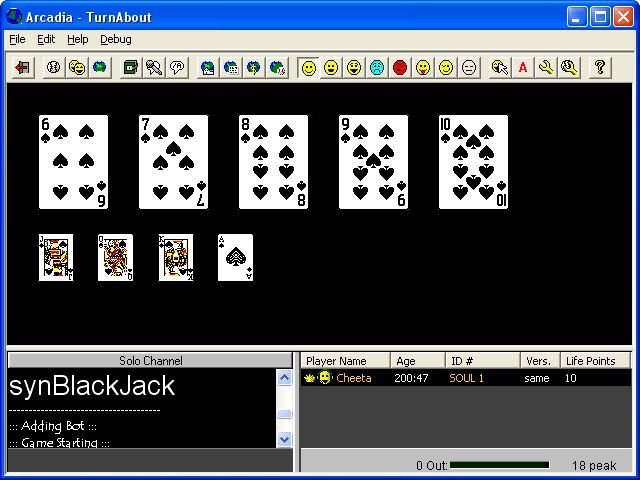
-----------
-- TA_StockDeckShuffle( seed,
numdecks)
--
-- Creates and shuffles a deck of playing cards.
You must call this before calling
TA_StockDeckPeek or
-- TA_StockDeckTake.
--
-- Arguments:
-- * a random seed value. Use 0 for "Don't
shuffle, I want them in starting order"
-- * a number of decks (1-4) to be shuffled
together into one big deck
--
-- Values Returned To You: none
--
-- Example Usage:
-- Shuffle
up a random deck with 4 * 52 cards in it.
TA_StockDeckShuffle( math.random(1000000), 4 )
-----------
-- TA_StockDeckPeek( offset
)
--
-- Let's you peek at cards coming up in the deck,
without removing them from the
deck
--
-- Arguments: an offset value (0 for top of
deck, 1 for the card below that, ...)
--
-- Values Returned To You: the (row, col) of the
nth card in the deck, which is NOT removed
--
-- Example Usage:
-- Shuffle
up a random deck of 52 cards.
TA_StockDeckShuffle( math.random(1000000), 1 )
-- Now tell me the 23rd card in the deck
local row
local col
row, col = TA_StockDeckPeek( 22
)
-- Now render that to the screen
TA_DrawStockCard( 0, 100, 100, row,
col, 0)
-----------
-- TA_StockDeckTake()
--
-- Removes the top card from the most recently
shuffled deck. If the deck is empty, the return
values
-- will be nil (and you should reshuffle)
--
-- Arguments: none
--
-- Values Returned To You: the (row, col) of the
top card of the deck, which is then removed
--
-- Example Usage:
-- Shuffle
up a random deck of 52 cards.
TA_StockDeckShuffle( math.random(1000000), 1 )
-- Now give me the first card from the deck
local row
local col
row, col = TA_StockDeckTake()
-- Now render that to the screen
TA_DrawStockCard( 0, 100, 100, row,
col, 0)
|
| Bags - Storage
Support So, your game needs to be able to
store information which is remembered the next
time the player plays the game. What are you to
do? All your lua tables evaporate as soon as the
toy is unloaded. And the lua io library is not
supported.
Welcome to the
strangely-named API concept: the Bag.
A bag is sort of
like an INI file in the sense that you save
information like:
"numAcorns"
= "34"
Your game can
provide as many bags as it likes. Maybe one bag
for the user's preferences, one for their
trophies, etc. Or all in one bag. Or no bags at
all. A bag is, in fact, a file. The word 'bag'
need never be seen by the end user. But it was
more fun to call them bags than files.
Each style of
mini-game has its own bags (feud bags are
different from blackjack bags), and each account
on your PC has his own bags for each mini game
(samsyn's monopoly bags are different from
Cheeta's monopoly bags), and your mini game can
define more than one bag. So -- lots of bags are
possible. But you'll probably just use one per
player per style.
Oddly enough,
bags are NOT .ini files and they DO detect
tampering. Also, they are not super fast, so
don't spin in a loop doing bag work all day or
you will burn a hole in your hard drive (um,
that's a joke)
Tell me
MORE about Bags!
So, a bag has a
NAME (like "options" or "bling" or "high
scores"
or... The important thing is that your bag name
is going to be part of a file name, so it can't
use any characters which are not legal in files
names. I strongly suggest sticking to simple
alphanumeric, no spaces, no punctuation, no
'foreign' characters. Your user never sees the
bag name, so you get no points for having some
infantile xxxXX1337haxxorXXxxx bag name.
Inside a bag are
some number of ITEMS, where each
ITEM is a KEY/VALUE
pair.
KEYS
are things like "first
name"
or "bio/name" or "options/screen/width" (that is to
indicate you can use FORWARD SLASHES
(not back slashes) to make a sort of
hierarchy. Which of course means you should not
be using slashes for anything else.
In theory, you
can have an unlimited number of items in a single
bag, but practically it isn't really designed to
be at all efficient, so monstrous bags (a million
items) would probably be very slow to use. (and
huge on disk, as well)
An Item VALUE
is always saved as text, so when you read it back
you might have to do something to cast it into a
number, if that is what you want.
-- save it
to my bag
local ammoCount = 123
TA_SetBagValue( "weaponBag",
"ammo", ammoCount )
-- read it
back
ammoCount = tonumber( TA_GetBagValue(
"weaponBag", "ammo" ) )
You will
probably want to craft some helper function like
the following:
function GetNumberFromString(
string, defaultValue )
local
value = tonumber( string )
if ( not value ) then
--
Guess that wasn't a legal number
value
value = defaultvalue
end
return value
end
Or even
something like:
function GetNumberFromBag(
bagName, keyName, defaultValue )
local
value = tonumber( TA_GetBagValue(
bagName, keyName ) )
if ( value ) then
return
value
end
-- No previously saved numeric value in
that bag item, apparently
return defaultValue
end
Since all values
are saved as strings, you can have big old nasty
numbers like 12127618726.834734798247. But you
can also have 0.999999999999999999 when you were
expecting "1". The life of the
programmer is cold and lonely. Read more about
lua to see how to round off values or format them
in various ways.
HOW BIG
CAN A KEY or VALUE be?
KEYs are
limited to .. um 200ish characters
VALUES are limited to.. 700ish characters
Lua numbers are also limited to some range,
but you'll have to look that up
-----------
-- TA_SetBagValue( bagName,
keyName, newValue )
--
-- Saves the 'newValue' as a bit of text in the
specified bag, under the given key. Overwrites
any
-- previous value in that key. NewValue can be a
number, but will be stored as its text
representation.
--
-- Arguments:
--
-- * bagName: the name of the bag file, like
"options"
-- * keyName: the name of the key, like
"video/width"
-- * newValue: the value you would like to set it
to, like "800"
--
-- Note: if you use 'nil' for the newValue, the
current entry will be deleted from the bag
completely
--
-- Values Returned To You: none
--
-- Example Usage:
-- Save his
current bank account
TA_SetBagValue( "data", "bank/account", 1234 )
-----------
-- TA_GetBagValue( bagName,
keyName)
--
-- Retrieves the current value for the specified
key in the specified bag, and returns it as a lua
string
-- value. If there is no key of that name in the
bag, this will return nil.
--
-- Note: this does not affect the contents of the
bag.
--
-- Arguments:
--
-- * bagName: the name of the bag file, like
"options"
-- * keyName: the name of the key, like
"video/width"
--
-- Values Returned To You: nil, or the string
stored in the bag under that key
--
-- Example Usage:
-- Fetch his
bank account balance
local bankAccount = 0
bankAccount = tonumber(
TA_GetBagValue( "data", "bank/account" ) )
if( not bankAccount ) then
-- it
wasn't a number!
bankAccount = 0
end
-----------
-- TA_NumBagItems( bagName {,
keyName/} )
--
-- If you don't know the exact name of the key
you are looking for, and need to rummage through
-- all the keys in the bag, then TA_NumBagItems()
and TA_GetNthBagItem() are how you do it.
-- These functions can also take an optional
keyName argument which makes them only consider
-- keys which start with the keyName argument.
--
-- Arguments:
--
-- * bagName: the name of the bag file, like
"options"
-- * keyName: [optional] the name of the key
'section', like "video/"
--
-- Values Returned To You: the number of items in
the bag which match that key root
--
-- Example Usage:
-- How many
items are there in the 'data' bag total?
local numItemsTotal = TA_NumBagItems(
"data" )
-- How many items have a keyName which starts
with 'bank/'?
local numBankItems = TA_NumBagItems(
"data", "bank/" )
-----------
-- TA_GetNthBagItem( n, bagName {,
keyName/} )
--
-- Returns the key AND the value of the nth item
in the bag. If the keyName argument is included
-- then it limits the search to items with the
specified keyRoot.
--
-- Note: if you use the keyName argument, it only
makes sense if you use the same keyName
-- value in your call to TA_NumBagItems() and do
not add/delete keys in the meantime.
--
-- Arguments:
--
-- * n: the nth (starts with 1) in question.
-- * bagName: the name of the bag file, like
"options"
-- * keyName: [optional] the name of the key
'section', like "video/"
--
-- Values Returned To You: the KEY and VALUE of
that item (or nil, nil if no such item exists)
--
-- Example Usage:
-- How many
items are there in the 'data' bag total?
local numItemsTotal = TA_NumBagItems(
"data" )
-- How many items have a keyName which starts
with 'bank/'?
local numBankItems = TA_NumBagItems(
"data", "bank/" )
--
local key
local value
local i
-- iterate over all items
for i=1, numItemsTotal do
key,
value = TA_GetNthBagItem(
i, "data" )
end
-- iterate over all bank items
for i=1, numBankItems do
key,
value = TA_GetNthBagItem(
i, "data", "bank/" )
end
-----------
-- TA_DeleteBagItems( bagName {,
keyName/} )
--
-- Deletes multiple items from the bag. If the
keyName is provided, then all items
-- whose keys start with that keyroot will be
deleted. If no keyName is provided then
-- ALL items in the bag will be deleted.
--
-- Note: To delete a single item, just use TA_SetItemValue()
to set it to a value of nil
--
-- Arguments:
--
-- * bagName: the name of the bag file, like
"options"
-- * keyName: [optional] the name of the key
'section', like "video/"
--
-- Values Returned To You: the number of items
which were deleted, if you care
--
-- Example Usage:
-- Delete
all the "bank/" items from the bag
local count = TA_DeleteBagItems(
"data", "bank/" )
-- Oh heck, just delete EVERYTHING in the
'data' bag
local count = TA_DeleteBagItems(
"data" )
|
| Edit Box Support So, TA_OnText and
TA_IsKeyDown are nice in their way, but you want
to ask the user to enter some text and you want
them to have a little window to type it into and
edit it and paste and copy to and from it and
some junk. Does TurnAbout have anything in its
API for YOU?
Why yes, fussy
programmer person, it does. (as of release
.0019). Meet the EditBox. This is a rectangle you
can place in your main display area (image buffer
0 only). You set its size, position, background
color, text color, font name, font size, and some
flags indicating how the text inside of it should
be formatted. You can also pre-fill it with some
text. The user can then click inside that window
and edit the text just like any other Windows
edit box.
You can then, at
your leisure, get the text back out of the box
and do something with it. And let me tell you,
this was a total pain to set up, so I hope you
appreciate it, fussy programmer person!
You can actually
have lots of edit boxes defined at the same time,
so each one has its own unique handle, given to
you when you first create it. You are responsible
for destroying edit boxes you no longer need. In
between their being created and destroyed, you
can dynamically move them around and/or hide
them. But don't forget to destroy them before
your game terminates.
Edit Box
Flags
Edit boxes
support all the flag bits defined by Windows for
edit boxes. The more popular flags are shown
here. Add together the value of all the flags you
want. You cannot change the flags after creating
the edit box. Not all flags work together (for
example 'centered' vs left or right justified
text)
| 1 - centered text |
| 2 - right-justified |
| 4 - multi-line |
| 8 - upper case |
| 16 - lower case |
| 32 - password (*s) |
| 64 - auto vscroll |
| 128 - auto hscroll |
| 2048 - readonly |
| 4096 - want return |
----------
-- handle
= TA_EditBoxCreate( flags, rect,
limit, textColor, bkColor, fontSize, fontName )
--
-- This creates a brand new edit box using the
parameters you provide and returns a handle (or
nil if you have run out)
-- for you to use in other editbox calls.
--
-- NOTE: If you create it, you must eventually
destroy it, so keep the handle in a safe place
until you do.
--
-- Arguments:
--
-- * flags (see above)
-- * rect - the rectangle on the main display
(imageBuffer 0) where the editbox appears
-- * limit - the max characters which can be
entered into the box by the user.
-- * textColor - the color of the text (e.g.
"ff0000" for red)
-- * bkColor - the background color of the box
(e.g. "000000" for black )
-- * fontSize - the size of the characters (e.g.
120 for 12 pt ish)
-- * fontName - the font to use (e.g.
"arial")
--
-- Values Returned To You: The HANDLE of the box,
or nil if it failed to create it
--
-- Example Usage:
-- Edit
boxes live a long time, so use a global to
hold the handle
glMyEditBox = nil -- I haven't made it yet
...
-- Make a box with red verdana text on a
black background, limited to 100 chars max
local rect = {100, 100, 500, 150}
glMyEditBox = TA_EditBoxCreate(
0, rect, 100, "ff0000",
"000000", 120, "verdand"
)
...
-- Get Whatever the user has typed into it by
this moment here
local text = TA_EditBoxGetText( glMyEditBox )
...
-- Hide the box for a minute (it still
exists, it is just invisible)
TA_EditBoxShow( glMyEditBox, 0 )
...
-- Bring it back and pre-load it with text
TA_EditBoxShow( glMyEditBox, 1 )
TA_EditBoxSetText( glMyEditBox,
"You didn't type this!" )
...
-- Move it to a new spot
local rect = { 25, 25, 123, 37 }
TA_EditBoxSetRect( glMyEditBox, rect )
...
-- I am all done with it, destroy it!
TA_EditBoxDestroy( glMyEditBox )
-- nil out the handle so I don't forget it
was destroyed
glMyEditBox = nil
----------
-- TA_EditBoxDestroy( handle )
--
-- Deletes the edit box. Use the handle you got
from TA_EditBoxCreate. The handle itself is no
longer useful
-- after this, so set it to nil or something so
you don't forget
--
-- Note: as a convenience for lazy programmers,
use handle = -1 to destroy ALL edit boxes. For
example, as
-- you shut down.
--
-- Arguments:
--
-- * handle - the value returned from TA_EditBoxCreate
--
-- Values Returned To You: none
--
-- Example Usage:
See Above
----------
-- TA_EditBoxShow( handle, showIt
)
--
-- Makes a previously-created edit box appear or
disappear. This does not create or destroy the
edit box,
-- it just makes it temporarily
visible/invisible, which can be convenient if you
only need it now and then.
--
-- Arguments:
--
-- * handle
-- * showIt (0 for hide, 1 for show)
--
-- Values Returned To You: none
--
-- Example Usage:
See Above
----------
-- TA_EditBoxSetRect( handle, rect )
--
-- Moves the edit box to some other spot on the
screen, without changing contents, colors, etc.
--
-- Arguments:
--
-- * handle
-- * rect (new dimensions of edit box on image
buffer 0)
--
-- Values Returned To You: none
--
-- Example Usage:
See Above
----------
-- TA_EditBoxSetText( handle, text )
--
-- Replaces the contents of the box with the new
text. The box is never automatically emptied for
you,
-- so use this command to clear out the user's
input as soon as you feel is proper.
--
-- Arguments:
--
-- * handle
-- * text
--
-- Values Returned To You: none
--
-- Example Usage:
See Above
----------
-- text
= TA_EditBoxGetText( handle )
--
-- Fetches the current text from inside the box.
It does NOT erase the contents of the box.
--
-- Arguments:
--
-- * handle
--
-- Values Returned To You: text from inside the
box
--
-- Example Usage:
See Above
|
| Load
Time Function Execution Being a veteran
programmer, you probably know that in addition to
your functions, you can also have code 'at the
root' which is executed when your script is
loaded. While you might seriously consider
putting hard core initialization of your global
variables at that level, bear in mind that a game
might get (or might not) restarted without
necessarily reloading the lua file.
So don't forget
to do initialization as appropriate in your
OnLoaded and OnStartGame event handlers.
|
|
|